See what changed
Compare any period against the one before it and see the movement broken down by service.
Compare periods, isolate services and see what moved the total. Bring the drivers of cloud spend into planning, budget reviews and customer conversations.

Compare any period against the one before it and see the movement broken down by service.
Rank contributors so the story behind a variance is visible without exporting to a spreadsheet.
Each trend view isolates one question—total movement, service movement or rate versus usage.
Cloud Ctrl is built and hosted in Australia. Usage and billing data stays in Australian-hosted infrastructure, and a customer-controlled Azure deployment remains available for stricter requirements.
Trends pairs every period with its predecessor, then attributes the difference to the services that caused it.
Finance and engineering can use the same breakdown to discuss whether a change reflects expected growth, a new workload or something that needs investigation.
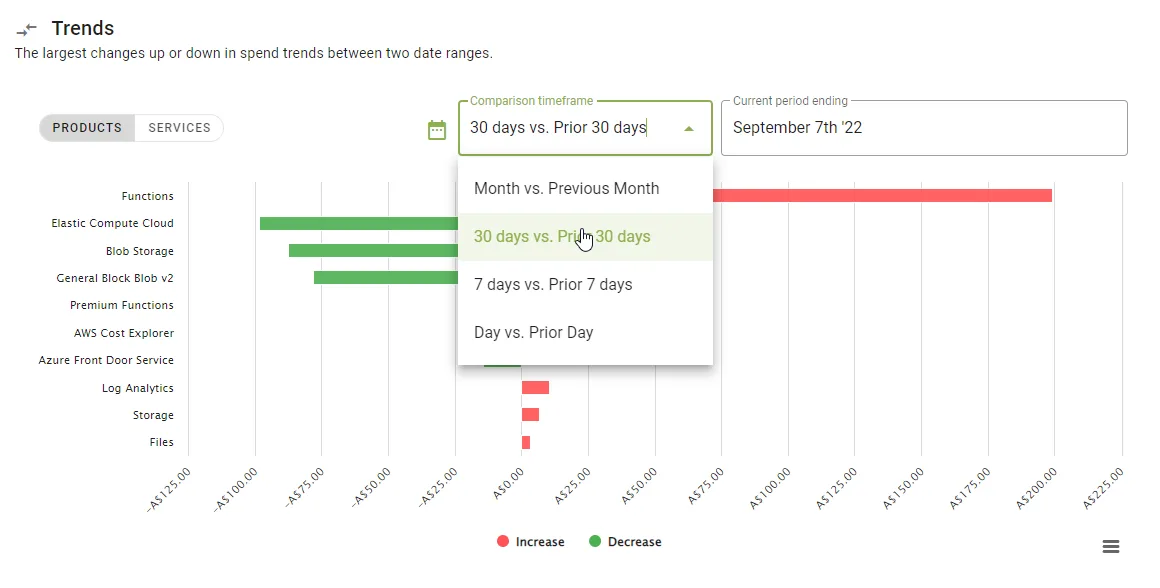
A variance is a starting point, not an explanation on its own. Bring the service and usage detail to the accountable team so you can connect the change to business activity and agree the next step.
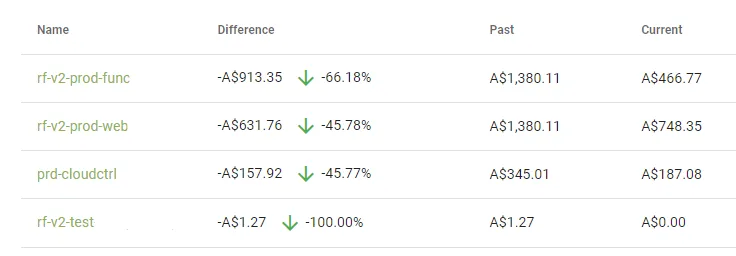
Select the window that matters—last month, last quarter or a custom range.
See movement by service, ranked by contribution to the change.
Drill into the services that moved and the usage behind them.
Review the driver with the accountable team and agree whether to adjust usage, investigate or update the plan.